13 min read
How I Design a Company CMS and a Shared Application Foundation with Laravel
Why start from scratch with every website? I explain how I designed an internal content management system and a shared foundation for Laravel applications. Practical examples show how its parts fit together, how it simplifies website management, and what I found challenging about extensions and updates.

When building websites, the same needs recur: sign-in, editing content, and deciding who may change what. A starter kit is a prepared foundation that brings these common features together. Developers can focus on the client’s needs instead of starting from scratch each time.
The starter kit described here is exclusively for our company’s projects. Its code is organized into private packages in a private GitHub organization. It is not available to browse or download publicly; this article shares the design principles and my development experience.
For someone managing a website, this is a content management system, or CMS: much like WordPress, it provides an administration interface for pages, articles, and images. It is built on Laravel, a tool for developing web applications that also allows custom business processes. This is a separate system; WordPress extensions cannot be used in it.
I decided to write this article to explore how a common foundation can save work when creating a website and make its later development easier. I explain its parts, how they support everyday administration, and the decisions I found most challenging.
From a shared skeleton to a modular foundation
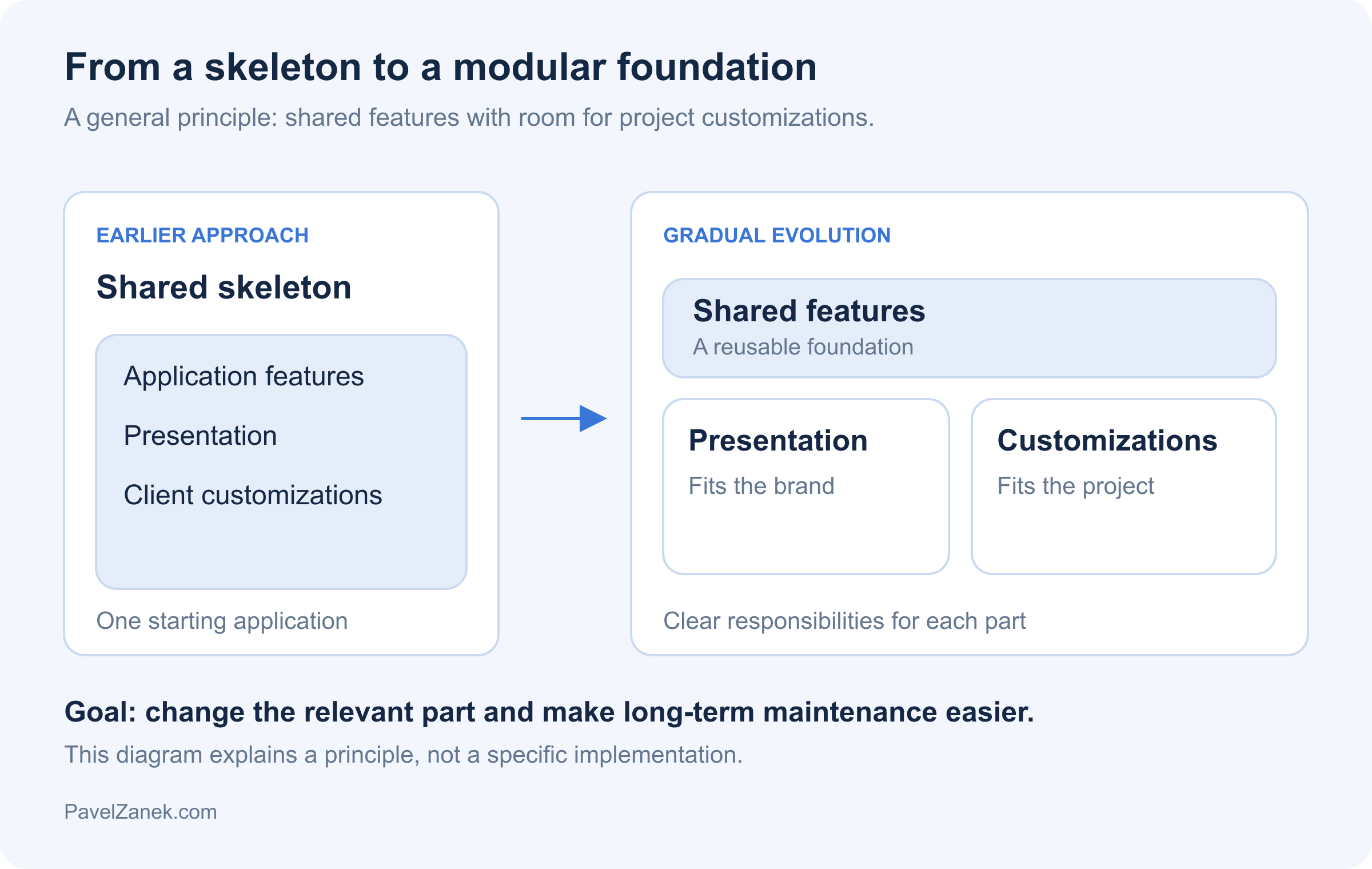
The original skeleton was a prepared starting application: a common structure with recurring features already brought together in one project. Think of it as a starting version of a website that developers could adapt to a particular brief. It saved the work of preparing the same foundation repeatedly and gave projects a consistent starting point.
As each project acquired its own customizations, transferring improvements between applications became harder. That was when I realized the shared foundation needed to remain useful long after a website was created. I needed a clearer boundary between shared features and changes for a particular client. Long-term maintenance was my main reason for changing the architecture.
The four parts of an application
Laravel remains the foundation. While official starter kits help start an application, a modular platform also standardizes recurring features, their collaboration, and the ways they can be extended.
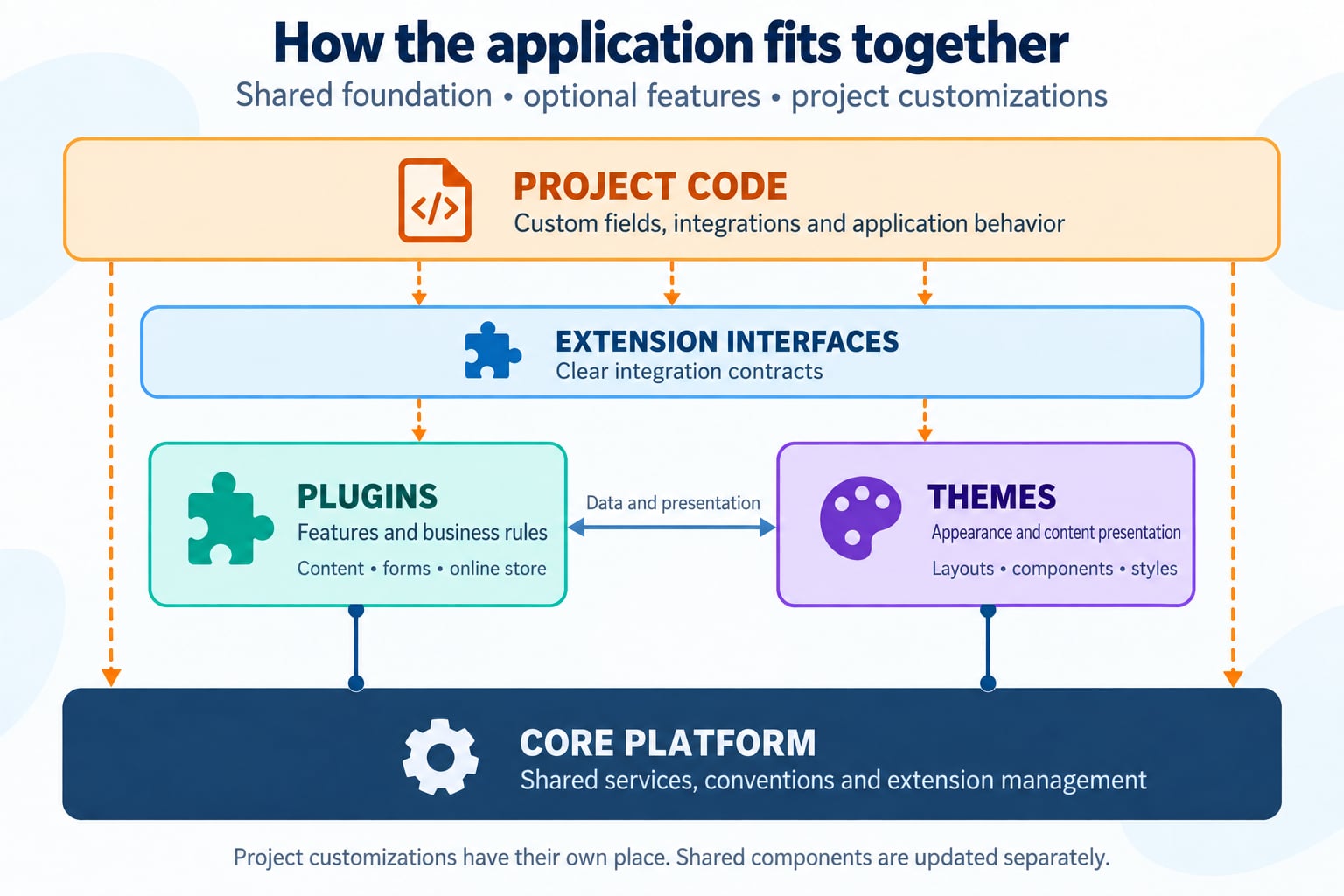
Core platform: shared technical infrastructure
The core connects the other parts. It manages plugins and themes, checks what they need to function, and provides shared rules for settings, languages, and integration with the administration interface.
Specific content and business features belong outside the core. The core does not need to contain blog or order logic, which keeps it useful across different kinds of applications.
Plugins: features selected for the project
Plugins add complete features to match the website: pages and articles, team profiles, customer testimonials, announcements, search, or an online store. Each brings its data, behavior, and administration controls. A small company website can use a presentation of services and a contact form, while a store also needs products, shipping, and payments. Sharing a foundation does not mean every project must use every available feature.
Technically, a plugin is a Laravel package: a self-contained addition to the application. It also follows our platform’s rules so the core can enable it and connect it to the administration interface. An ordinary Laravel package is not automatically a managed plugin.
Themes: appearance and presentation
Themes determine how visitors see content and features. They cover page layouts, visual components, styles, and other presentation elements. Business rules and data remain separate, so a design change does not require rewriting the application’s functionality.
A custom design can build on a shared theme and change only the relevant parts, such as a header, page layout, or product card.
Project customizations: room for specific requirements
The project layer brings the selected parts together and contains what is unique to that application: additional fields, business rules, integrations, or customized behavior. These extensions have their own place, separate from shared packages.
A reproducible environment and a clear installation process
Working with the kit follows a documented setup process. Developers prepare the settings, database, and website presentation; diagnostic tools help identify anything missing. New team members do not have to discover hidden installation steps.
Local development keeps real client data separate from demonstration content. A clean website starts with neutral content and guidance for the first steps. Launch safeguards prevent a process for rebuilding a test website from accidentally deleting data in an application already in use.
Operational readiness includes work visitors do not see. A sign-in code must arrive promptly, while less urgent emails can be sent in the background. If sending fails, administrators need to find the error and be able to retry.
Enabling features with predictable results
Installing a plugin and activating it are separate actions. A feature can be prepared before it is enabled, and activation takes its dependencies into account. This makes it clear which parts of the application are actually in use.
Disabling a feature preserves its data; deleting that data is a separate, deliberate decision. Adding a feature does not automatically grant new permissions to everyone. Administrators control who can use it. During maintenance or launch preparation, visitors can see an informative page while an authorized administrator continues working with the website. Features prepared inside the application are therefore separate from what should currently be available to the public.
Authentication, permissions, and security
Access to the admin panel is separate from permission to perform individual actions. Being able to sign in does not mean a user should be able to edit every record or export all data.
Account protection continues after sign-in. A second verification step, such as a one-time code, also protects private previews; changing a password ends other signed-in sessions. Important actions are recorded. Personal information can be located, exported, and deleted in a controlled way that accounts for related records, such as unfinished orders. Retention rules follow the operator’s requirements.
Security configuration matches the particular website. It includes protecting forms against abuse and limiting excessive requests. Permission to work with data is also checked for bulk changes, printing, and exports.
Administration designed for extension
Administration provides familiar controls across features. Staff can save useful filters and views, share them with colleagues, and export or print data when permitted. Change history appears with the record being edited, previews help before publication, and selected records can be updated together. Saving remains within reach in longer forms, and closing a form with unsaved changes prompts a warning. The administration interface also accommodates smaller phone screens.
A project can extend designated parts of a form, listing, or export. Adding one field does not require copying an entire shared feature and maintaining a separate version. The extension remains part of the particular application.
An example is a special product detail. Adding a field is only part of the work: it must be clear which values it accepts, who can edit it, and where it appears. Development tools help keep its controls consistent with other features.
One website, three perspectives
Who | What they work with | Example |
|---|---|---|
Visitor | The public website and its features | Reads an article or submits a form. |
Editor | Content in the administration interface | Edits text, adds an image, and publishes with the appropriate permission. |
Developer | The application’s features and appearance | Connects a plugin, adjusts a theme, or adds a project-specific feature. |
How the parts work together in a website
A website combines selected features with a theme and customizations for the client’s needs. The same published content can also be supplied through a prepared interface to another application, such as a different website or mobile catalogue. This interface is called an API: a controlled way for systems to exchange data. Access respects permissions and published language versions; unfinished articles and private customer information do not become public through this channel. Reading content does not require a second, manually maintained copy.
An online store connects the parts into a complete buying journey. A customer selects a product, applies an eligible discount code, chooses available shipping and payment options, and sees the total before submitting the order. The store handles tax settings, company purchases, documents, and payment details including QR payments. An unavailable product can offer a back-in-stock notification. Themes determine how these screens look, while business rules remain in the functional layer. Changing the design does not itself change price calculations.
Cooperation also needs to preserve the meaning of stored data. An order keeps the product name, price, and customer details that applied when it was placed. Later changes to the catalogue or address book must not rewrite that history. The order is saved as a complete operation, and follow-up work starts only after it has been successfully stored.
Repeated submissions need clear rules too. Clicking twice should not create two orders, and retrying after an error should not repeat steps that already succeeded.
SEO, content, and integrations that work together
Managing content includes preparing articles ahead of time, checking a preview, and scheduling publication. Editors can adjust the title, description, and sharing image for each language, with previews to help visualize search and social results. The system maintains a list of addresses for search engines and connects language versions. Redirects help when addresses change, while records of missing pages reveal broken links visitors encounter. Website search brings together content from different enabled features.
Content management also includes images. The system prepares sizes and efficient formats from an uploaded photograph for different places on the website. Editors mark the important part that should remain visible when cropped and check previews of the result. An authorized administrator can adjust processing rules; affected images are then regenerated in the background. Processing also includes reducing oversized originals and removing unnecessary metadata. Editors do not have to prepare every variant manually.
Text is entered once and processed consistently for pages, search results, short descriptions, and translation services. Different features therefore use the same meaning of the content without exposing editor markup to visitors. Translation and AI services help the editorial team, but a person still reviews their suggestions. The editor remains usable without an optional external service.
Localization across the whole user journey
Language settings also affect emails, notifications, documents, and the formatting of prices and dates. The language of a visitor and that of an administrator can differ: an order placed on an English website does not mean that a Czech-speaking member of staff should receive English notifications. Each message needs to respect its recipient’s context.
Multilingual publication is assessed per language so visitors do not see unfinished translations. Supporting text can use a fallback language, but an unpublished language version of a page must remain private.
Checking quality: from individual parts to a working website
Automated tests repeatedly check expected behavior, while other tools look for problems in the code. The number of successful checks alone does not prove that the whole website works well.
Those checks are complemented by using the website as an editor, customer, or administrator. A customer, for example, moves from selecting products through ordering to opening a document. This reveals problems between features that appear to work separately.
Testing includes a fresh installation and an update with client data and customizations. It also covers supported versions of underlying tools, readability, keyboard operation, and mobile use. Success on one developer’s computer is insufficient.
Performance of the assembled application
Performance depends on the whole page. Menus, images, and products may each load quickly but together repeatedly request the same information. Speed is therefore checked with content representative of everyday use.
The same principle applies to administration: expensive information loads when its section is opened. A cache, which stores prepared results, also helps. It must refresh when content or settings change so that a fast website also shows current information.
Documentation and context for AI agents
A project receives guides for common changes and troubleshooting with its packages. Developers can consult them while working and add project-specific instructions. This makes it clear where a change belongs and what else it affects.
AI agents, tools that help write and change code, need the same context. Clear conventions, accessible documentation, and tools such as Laravel Boost help them work within project boundaries. I explore this in my article about vibe coding in Laravel and guardrails for AI agents.
Documentation evolves with the application and describes verified behavior. Clear boundaries and conventions also help when taking over an existing Laravel application.
Updates as part of the design
The core, plugins, and themes have their own versions and declare their dependencies. Updates therefore account for compatibility between parts, while project customizations remain separate from the shared code being updated.
Changes distinguish shared settings from project customizations. Where the structure allows it, updates compare individual entries rather than entire files. Adding a project-specific setting need not prevent an unrelated improvement from being adopted. If both sides change the same entry, the developer sees the specific conflict and can deliberately keep the project’s version. Settings owned entirely by the project remain under its control. This reduces manual merging and the risk of overwriting work unintentionally.
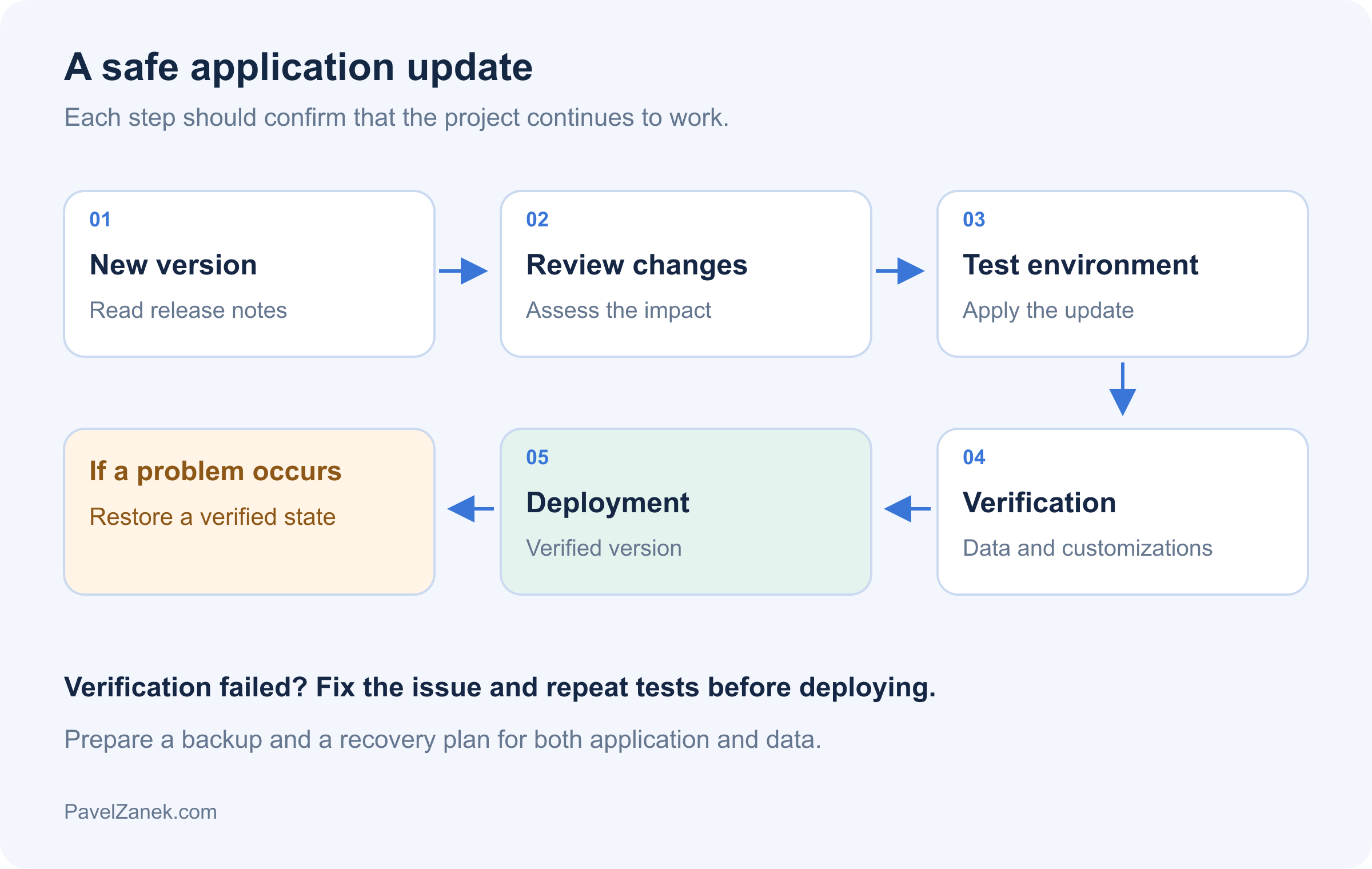
An update is first verified in a working branch and test environment, including important scenarios, data, and project extensions. Production receives a verified version with a recovery process prepared. My Laravel deployment checklist for production covers the steps that follow.
What I found most challenging during development
Understanding the consequences of design decisions was hardest when those consequences would only emerge during later changes to the application. That gradually changed how I judged a good shared foundation.
Updates that respect project customizations
For updates, I had to rethink my approach to the entire design. Initially, I focused mainly on which features the shared foundation should contain. Over time, how those features would change and be extended became more important. Delivering a new package version is not enough: I need to understand what it will do to customizations a developer has added in the meantime. The hardest decision was where the shared foundation’s responsibility ended and the project’s began. Planning for updates therefore also shaped the separation of the core, plugins, and project code.
Where the core ends and a specific feature begins
For the core platform, the challenge was resisting the temptation to put every new requirement into the core. A simple question helped: does a website without a blog or store need this feature too? If not, it usually belongs in an extension or a particular project.
An API that is straightforward to work with
I also paid close attention to the interface for developers. The API mentioned earlier passes data between applications; here, the interface defines where developers can extend the system itself. They need to recognize which extension points they can rely on through updates. Documentation describes them, and tests protect them.
I kept AI agents in mind when designing the developer interface. They pushed me to document rules that might otherwise remain in the author’s head. What seems obvious to me may be unclear to an agent or a developer seeing the project for the first time. I therefore favor practical examples of complete changes over isolated code samples.
The cost of flexibility and the boundaries of the foundation
Modularity has a cost. I deliberately accepted that preparing a shared foundation would take more work than building a single finished application. Separating the parts, defining how they work together, and documenting them takes time that is not immediately visible. Developers need room for their own solutions, but also guidance on how to avoid making the next update harder. I value that predictability more than unrestricted freedom to change anything anywhere. This investment makes most sense across several long-lived projects; for a small, one-off website, the foundation may be unnecessarily extensive.
Checklist: what a good Laravel starter kit should provide
A reproducible environment and a clear installation process.
Authentication and permissions with explicit access rules.
Administration with consistent conventions and supported extension points.
Content, SEO, and integrations selected for the project's needs.
Clear separation of shared code, presentation, and project customizations.
Predictable feature activation and deactivation that preserves data.
Tests and static analysis backed by installation, integration, and upgrade checks.
Documentation for the team and AI agents that reflects the actual state.
Updates that make ownership and the scope of changes clear.
Thinking back, if I were starting again, I would test these requirements much earlier through a few complete scenarios: setting up a project, adding a custom feature, and then updating the shared foundation. These examples quickly reveal whether the separation of parts actually helps. I would spend more time defining those boundaries and less on the number of ready-made features. Today, I care more about how well the kit can be extended and maintained than about having every feature from the outset.
open_in_new Related resources
Links to related resources
Selected references, documentation, repositories, and other useful materials connected to this content.
hub Related content
Related content
Additional content from this site connected to this article.
Laravel Sail
Laravel Sail is the official Docker development environment for Laravel. It helps run the application, database, cache, and other services without manually installing the whole stack on a developer machine. It makes the most sense when you want a fast project start and a consistent local environment across the team.
Laravel Sanctum
Laravel Sanctum is a lighter authentication solution for Laravel applications that need to protect SPAs, mobile apps, or simple token-based APIs. Its strength is not replacing OAuth in every scenario, but practicality: it supports session authentication for first-party SPAs and personal API tokens with abilities for simpler integrations.
Spatie
Spatie is best known for its long-maintained PHP and Laravel packages. In practice, I see it as a source of proven solutions for recurring problems: permissions, media handling, activity logs, backups, data objects, webhooks, and other application concerns. The value is not installing everything, but choosing the package that truly simplifies the project.
Pest PHP
Pest PHP is a modern testing framework for PHP with a simple and readable syntax. It is not only a nicer way to write tests, but a tool that lowers the friction of testing regularly and fits naturally into the Laravel ecosystem. It helps most when tests are a normal part of development, not a separate chore at the end.
Larastan
I use Larastan as a way to bring static analysis into a Laravel project without ignoring Eloquent, facades, and the dynamic parts of the framework. It does not replace tests or review, but it can catch type errors, incorrect return values, and small problems that would otherwise appear only when the application is running.
Rector
I see Rector as a tool for the point where manual refactoring stops making economic sense. It can scan a PHP codebase, apply mechanical changes, and help with language or framework upgrades without forcing a developer to hand-edit thousands of tiny details. Its real value appears when it is part of a controlled process, not blind automatic rewriting.
Laravel Pint
Laravel Pint solves one quiet but important problem: the team no longer has to keep discussing PHP code formatting. It is built on top of PHP-CS-Fixer, ships with sensible Laravel defaults, and works well both for local fixes and CI checks. Its biggest value appears when code style stops being a code review topic.
Laravel Boost
Laravel Boost starts to make sense when an AI agent should stop answering in general terms and work with a real Laravel application instead. It helps the agent understand package versions, routes, database schema, configuration, and documentation, so suggestions are less detached from the project. It is still only support for the developer, but in a larger codebase it can remove a lot of manual lookup work.
